

What are some of the key differentiators that can propel small businesses forward? They include efficiency, productivity, and innovation. Microsoft has expanded the availability of one of its most dynamic tools to SMBs. A tool that can be a real game-changer for growth.
Copilot for Microsoft 365 is a powerful new addition to the M365 suite. It was first offered to enterprise customers only. But Copilot is now open to businesses of all sizes. As long as they have Microsoft 365 Business Standard or Business Premium.
Microsoft has positioned Copilot to revolutionize the way SMBs work. This innovative AI tool empowers users to generate creative content. It also streamlines workflows and unlocks new levels of productivity.
Let’s explore the exciting possibilities Copilot unlocks for your growing business.
How Copilot Streamlines Workflows
Copilot leverages the power of large language models (LLMs). LLMs are AI models trained on massive datasets. This enables Copilot to understand natural language and generate contextual responses. It offers intelligent suggestions and content within your Microsoft 365 applications.
Here’s how Copilot translates this technology into real-world benefits for your small business:
Effortless Content Creation
Struggling with writer’s block or repetitive tasks like email writing? Copilot can suggest text responses and complete sentences. It can even draft entire emails based on your initial input.
With just a few guiding prompts, your team can:
- Craft compelling marketing copy
- Write concise customer service responses
- Create dynamic PowerPoint presentations
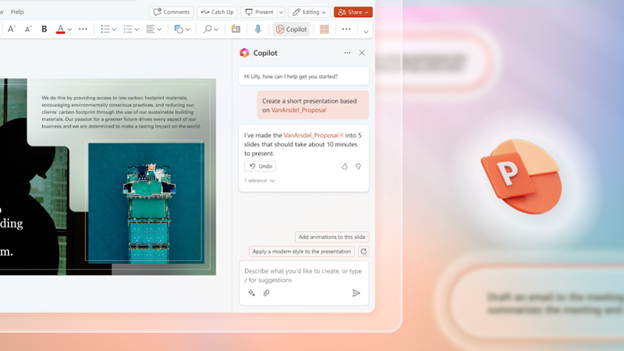
Enhanced Productivity
Copilot automates repetitive tasks and streamlines workflows by offering intelligent suggestions. This can free up valuable time for your employees. It allows them to focus on more strategic initiatives. As well as high-value projects or core business activities. Imagine automatically generating reports or automating data entry tasks. This unleashes your team’s energy for creative problem-solving and innovation.
Improved Communication and Collaboration
Clear and concise communication is vital for any successful business. Copilot facilitates this by doing things like:
- Suggesting relevant phrases
- Correcting grammatical errors
- Ensuring consistent messaging across different applications
Improved communication fosters better collaboration within teams. This can lead to streamlined project execution and enhanced client interactions.
Reduced Learning Curve for New Technologies
Copilot provides context-aware guidance and suggestions. All while you work with your familiar Microsoft 365 applications. This can significantly reduce the learning curve for new employees. It allows them to become proficient in using the full potential of the suite more quickly. Imagine onboarding new team members with ease. As well as empowering them to contribute meaningfully from day one.
Real-World Applications of Copilot within Your SMB
Copilot’s capabilities extend beyond generic productivity enhancements. Here’s a glimpse into how different roles within your SMB can leverage Copilot:
Marketing and Sales Teams
Generate compelling marketing copy for social media campaigns. Craft tailored sales emails with targeted messaging. Develop engaging presentations with Copilot’s creative text suggestions and language model capabilities.
Customer Service Representatives
Respond to customer inquiries with increased efficiency and accuracy. Use Copilot’s AI-powered suggestions for crafting clear and concise responses. Imagine resolving customer issues faster and fostering a more positive customer experience.
Project Managers
Develop comprehensive project plans. Automate progress reports with a few text prompts. Collaborate seamlessly with team members using Copilot’s intelligent features. Streamline project management. Ensure everyone is on the same page from conception to completion.
Content Creators
Overcome writer’s block and generate fresh ideas for website copy. Teams can leverage Copilot’s help in brainstorming and content creation in many areas. Imagine producing high-quality content consistently. All while keeping modern audiences engaged and driving brand awareness.
Finance and Accounting Teams
Automate data entry tasks and improve data analysis with Copilot’s intelligent features. Generate reports with prompts for enhanced clarity. Imagine no more struggling to create reports. Gain valuable insights from data faster.
Getting Started with Copilot for Microsoft 365
The good news is that Copilot for Microsoft 365 is readily accessible to SMBs. It integrates seamlessly with your existing environment. Here’s how you can empower your team to leverage this powerful tool:
- Ensure Compatibility: Copilot is currently available for businesses with Microsoft 365 Business Premium or Business Standard.
- Activate Copilot: Buy the Copilot add-on to your subscription. Then, as needed, contact your IT support team for help using it within your Microsoft 365 apps.
- Explore and Experiment: Microsoft Copilot offers intuitive features. All within your familiar Microsoft 365 applications. Start experimenting with its capabilities. Discover how it can enhance your workflow and productivity.
- Invest in Training: Copilot is user-friendly. But you should still consider providing brief training sessions for employees. This helps ensure they understand the tool’s full potential. As well as assists them with leveraging its capabilities effectively.
Improve Your Team’s Use of Microsoft 365
Copilot for Microsoft 365 is not just another software update. It’s a game-changer for small businesses. By embracing this innovative AI tool, you can unlock a new level of efficiency. As well as empower your employees to achieve more.
Need some help from Microsoft 365 experts? Our team can guide you in using this resource to the fullest.
Contact us today to learn more.
This Article has been Republished with Permission from .
