

Calendars, task lists, and project planning are important business tools. Many people use Microsoft’s apps to power these processes. Including Planner, Microsoft To Do, and Project for the web.
These tools help keep processes on track and enable task accountability. But they’re separate apps. Switching between apps can be cumbersome. It adds more complexity to a workflow.
On average, employees switch between 22 different apps 350 times per day.
Microsoft is putting a dent in app overload. The company is rolling out a brand-new version of Microsoft Planner in early 2024. It’s packed with exciting features designed to simplify your project management journey.
What apps does the new Planner include?
The new Microsoft Planner combines:
- The current Planner’s collaboration features
- The simplicity of Microsoft To Do for task management
- The capabilities of Microsoft Project for the web
- The automation of Microsoft Copilot (the company’s AI companion)
The new Planner promises to be a powerful tool for staying organized. As well as boosting collaboration and achieving your goals with more ease.
Unifying Your Workflow: Tasks, Plans & Projects in One Place
Say goodbye to juggling several apps and hello to a streamlined experience. The new Planner goes beyond basic to-do lists. It seamlessly integrates tasks, plans, and projects under one roof.
This means you can manage everything from large to small. Including simple daily tasks to complex multi-phased projects. And do it all within a single, intuitive interface.
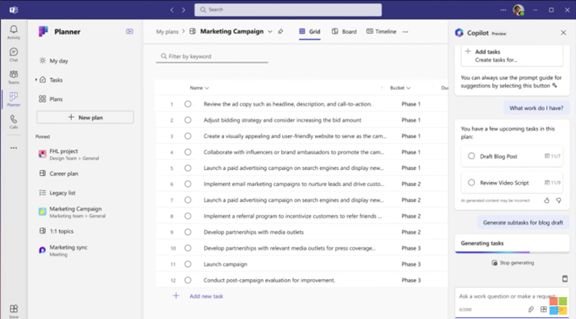
You can use the new Microsoft Planner from within Microsoft Teams or via a web browser. Here are some of the exciting things you will be able to do with it.
Enhanced Collaboration: Working Together Made Easy
Collaboration is key in today’s fast-paced world. Working remotely has become the new normal. Meaning tools need to keep people coordinated wherever they are.
The new Planner empowers teams to work together seamlessly. Real-time updates ensure everyone stays on the same page. Features like shared task ownership and comments foster clear communication and efficient collaboration.
AI-Powered Insights: Your Smart Copilot for Success
The new Planner incorporates the power of AI with Microsoft Copilot built in. This intelligent assistant helps you stay on top of your work. It can suggest relevant plans, tasks, and goals based on your needs and context. It can even analyze your progress and suggest adjustments to keep you on track.
Scaling with Your Needs: From Simple Tasks to Enterprise Projects
One size doesn’t fit all. The new Planner understands that. It offers flexibility to cater to both individual needs and complex enterprise projects. Microsoft Planner can adapt to your specific requirements. It’s flexible for use to fill big or small needs. Use it for managing a personal grocery list. Or to plan and deploy a large-scale company transformation.
Pre-Built Templates: Get Started Fast & Save Time
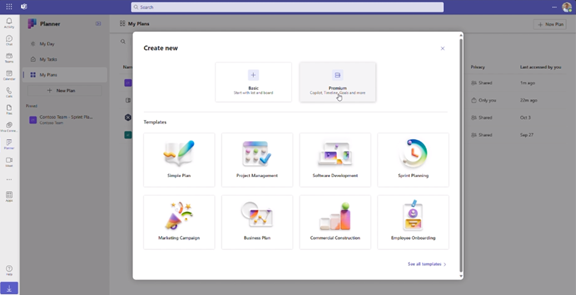
You don’t have to start from “square 1,” unless you want to. Microsoft Planner provides several ready-made templates. You can use these to get started on a new project or goal quickly.
You’ll see templates for things like:
- Project Management
- Software Development
- Sprint Planning
- Marketing Campaign
- Commercial Construction
- Employee Onboarding
- and more
Here’s a sneak peek at some key features of the new Microsoft Planner 2024:
- Improved Navigation: A redesigned interface makes finding what you need faster and easier.
- Enhanced Task Views: It has different views, like grid and board views. These let you customize how you see and organize your tasks.
- Microsoft App Integration: Planner integrates with many Microsoft tools. Including, Power BI, Teams, Microsoft Viva Goals, Power Automate, and more.
- Customizable Fields: Add custom fields to tasks. Use them to capture specific information relevant to your project needs.
- Goal Setting: Define clear goals and track progress visually within your plans.
- Critical Path: Identify the essential tasks needed to complete your project on time.
- Improved Search: Find the information you need quickly and easily. The app has powerful search functionality.
Access and Availability
Mark your calendars! The new Planner will be available in preview in early 2024. It will become generally available soon after. Some features will roll out later in the year. You can visit Microsoft’s site to sign up for updates and see a feature roadmap.
The Future of Tasks, Planning & Project Management
The new Microsoft Planner 2024 is an example of a trend we’ve seen in the digital world. Less is more. Meaning, fewer apps to juggle and more streamlined interfaces.
Planner’s powerful features make it an invaluable tool. One that both individuals and teams alike can leverage to streamline workflows. It also has an intuitive interface and AI-powered assistant to drive productivity.
Get Expert Business Software Support & Management
Managing both legacy and new cloud tools can be complex. Features often go underutilized. And security can be a big problem if it’s not done right. Our team of business software experts is here to help you.
Contact us today to schedule a chat.
This Article has been Republished with Permission from The Technology Press.
