

In a world where technology constantly evolves, Microsoft stands at the forefront. It continues to pioneer innovations. Innovations that transform how we interact with our digital universe.
The fall Windows 11 update is a testament to Microsoft’s commitment to excellence. It’s more than just an upgrade. It’s a leap into the future of computing. Microsoft touts it as “The most personal Windows 11 experience.”
Let’s explore some of the great features that make this update so significant.
Microsoft Copilot: Your Intelligent Partner in Creativity
A standout feature of the fall Windows 11 update is Microsoft Copilot. This AI-driven marvel is like your personal PC assistant.
Need help summarizing a web page? Want to change to dark mode, but forgot how? Looking for a quick custom image for a social media post? Microsoft Copilot can do all that and more.
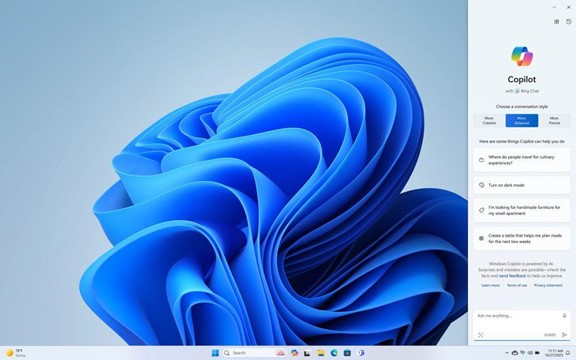
Copilot is seamlessly integrated into Windows 11. It offers real-time suggestions and turns ideas into reality with remarkable ease. Ask it what you need, and the AI engine gets to work.
Updated Apps (Paint, Snipping Tool, Clipchamp & More)
Have you ever wished that Windows’ Snipping Tool could do more? This update grants that wish. The Snipping Tool is just one of many to get an AI upgrade.
Look for new capabilities in Paint, Clipchamp, and Photos. Get a unique image from inputting a text prompt and style. The Cocreator tool in Paint makes it easy to jumpstart your creativity. It will generate the image, then you can edit it in the same app.
Microsoft Clipchamp is one of the easiest video creator tools out there. You can now just drag in your assets and clips. Then, click to have the AI engine work its magic to create a video for you.
The new Clipchamp Auto Compose feature can:
- Recommend scenes
- Make edits
- Create a narrative based on your inputs
Easy Data Migration with Windows Backup
When you buy a new computer, moving data can be a pain. It can take hours to move your “pc life” between devices. And there’s always the risk you’ll miss something.
The new Windows Backup feature makes moving between computers easier. You can choose backup options and folders. When ready to move, it’s a simple process. You can restore the new PC from another backed-up PC.
Microsoft Edge: A Faster and More Secure Browsing Experience
Microsoft Edge received significant enhancements. These focus on speed, responsiveness, and security. The Edge Secure Network feature offers more gigabytes. Microsoft increased user storage from 1GB to 5GB. This function encrypts your internet connection to secure data.
Edge Secure Network has many features of a VPN. This is great for extra online security. It’s also helpful for companies trying to prevent breaches from clicks on phishing links.
Save Energy & Battery Power
A feature called Adaptive Dimming is another enhancement of this update. Your screen slowly dims if you’re no longer paying attention. This has the dual benefit of saving energy and helping you refocus.
PC sensors power this feature as well as two others. So, it’s going to be more common with newer computers.
The other two features that use sensors are:
- Wake on Approach
- Lock on Leave
A More Personal Windows 11 Experience
Beyond the technical innovations, this update brings more. Including a more personal touch to the user experience. Tailored to individual preferences, Windows 11 becomes an extension of the user’s identity.
This includes things like:
- Personalized themes
- Custom widgets
- Intelligent assistants
Every interaction feels curated and intuitive. It makes for a truly personalized operating system.
Other Cool Enhancements
There’s a lot of excitement packed into Windows 11. Here are a few more new features you can explore.
- Copilot in Microsoft Shopping: Find what you need fast when shopping online. Bing will provide tailored recommendations based on your requests.
- Content Credentials: Add an invisible digital watermark to your AI-generated images in Bing. Cryptographic methods help you tag your work.
- Bing Chat Enterprise Updates: Boost work creativity and enjoy multimodal visual search. Find information using only images.
- DALL.E 3 Model from Open AI: Use the Image Creator in Bing and you’ll likely be impressed. It’s had an upgrade and uses the DALL.E 3 model to render images from text prompts.
Harness the Power of Microsoft Products
Microsoft is definitely a leader in work productivity tools. And it has been for a long time. If you’re still working like it was 2020, let us help you upgrade. Employees can be more efficient than ever with the right apps.
We’ve got your back with Microsoft 365, Windows 11, and other solutions. Our experts will guide you, so you can gain an edge on the competition.
Give us a call today to schedule a chat.
This Article has been Republished with Permission from The Technology Press.
